
Everyone sees everything
One giant board for the whole organisation. Each department wades through the others' work to find its own — and stops looking.
Cross-department project management · Self-hosted
Crosdesk is built for organisations where several departments deliver one project or one feature together. Each department sees its own work, the plan is computed from working-day estimates, and a scorecard tells you which department is landing on time — and which one is slipping, or stuck waiting on another.
The problem
Most tools are built for one team. Put three departments on one project and the same three things go wrong, every time.
One giant board for the whole organisation. Each department wades through the others' work to find its own — and stops looking.
Each department keeps its own tracker. The plan lives in a spreadsheet someone updates on Fridays, and the dependencies live in people's heads.
When the date moves, nobody can say whose part slipped, whether they were late or blocked, or what the original promise even was.
Crosdesk's answer: departments decide visibility, the plan is computed and kept as a baseline, and every department's slice is graded against it.
Departments
Every task belongs to one department; every project and feature to one or more. People see the work of the departments they are in — and the whole plan of any shared project their department is part of, because a plan you can only half-see is not a plan.
One checkout redesign, shared by Product, Design, Engineering and QA. Finance is not on it.
| Person | Design tasks | Engineering tasks | Shared checkout plan | Releases |
|---|---|---|---|---|
| Product manager | — | — | ✓ | ✓ |
| Designer | ✓ | — | ✓ | ✓ |
| Engineer | — | ✓ | ✓ | ✓ |
| QA engineer | — | — | ✓ | ✓ |
| Finance analyst | — | — | — | ✓ |
| Workspace admin | ✓ | ✓ | ✓ | ✓ |
Releases are a statement about the whole workspace, so everyone sees them.
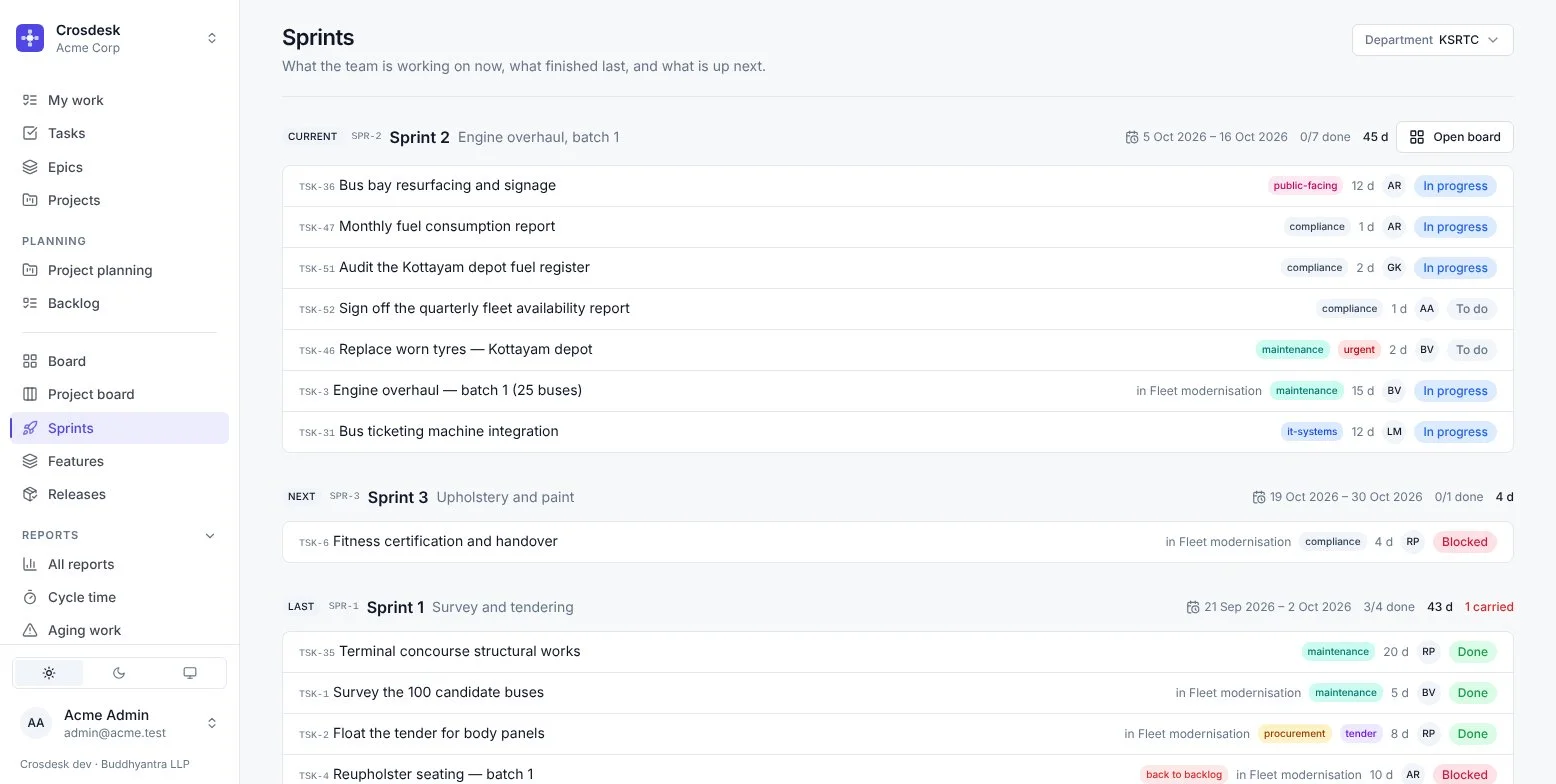
Each department runs its own sprints on its own cadence — one at a time, never overlapping — while sharing the projects above them.
An account is global; a membership is per workspace. Admin in one organisation, reader in another, side by side in two tabs.
No self-serve signup. Admins invite people into the departments they belong in; SSO signs them in but never grants a membership.
People who leave are disabled, not erased, so the record of who did what — and the audit trail — stays whole.
Department scorecard
Open any shared project and the scorecard grades each department's slice of it, against the dates the plan gave it. Sorted by who needs attention first.
Checkout redesign · PRJ-4
| Department | Done | On time | Actual ÷ est. | Blocked | Verdict |
|---|---|---|---|---|---|
| Engineering | 5/7 | 40% | 1.40 | 0 | Strained |
| QA | 4/9 | 75% | 1.05 | 3 | Blocked |
| Design | 6/8 | 83% | 1.10 | 0 | Steady |
| Product | 5/6 | 100% | 0.95 | 0 | Strong |
| Finance | 1/5 | — | — | 0 | Too early |
Empty is shown as empty, never as zero. The sample size sits beside every verdict, so a thin one is visible rather than implied.
In Crosdesk, Blocked comes out of the plan, not out of anyone's effort. A department waiting on another's work is flagged so you can unblock it — not marked down for it.
Only two inputs count toward a grade: did finished work land by its planned date, and did it take as long as the department said it would.
The scorecard grades teams. No report in Crosdesk ranks individuals — a number that grades people gets gamed or resented, usually both.
Projects
A project is work with a shape: some of it must happen before the rest. You lay it out on a canvas across departments, estimate in working days, and press Verify. From then on the plan, the baseline and the slip are all measured for you.
Each card is a task, each line means this follows that. Cards from different departments sit on one canvas — the concourse, the jetty that connects to it, the passenger information system that needs both.
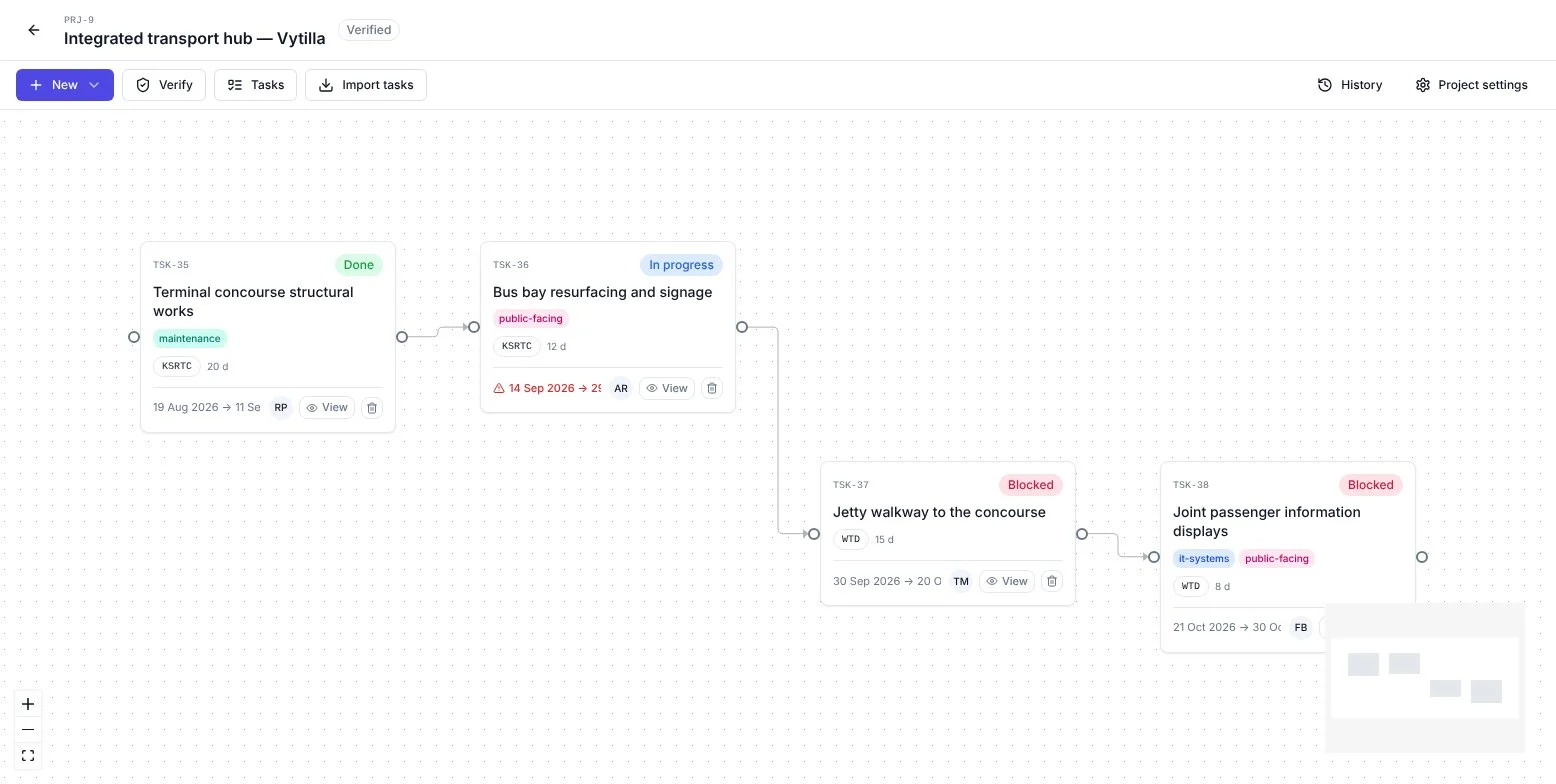
Verify lays every task out from a start date, around your working week and public holidays. It refuses a plan with gaps — an unestimated card, a disconnected one, a cycle — and names every problem at once.
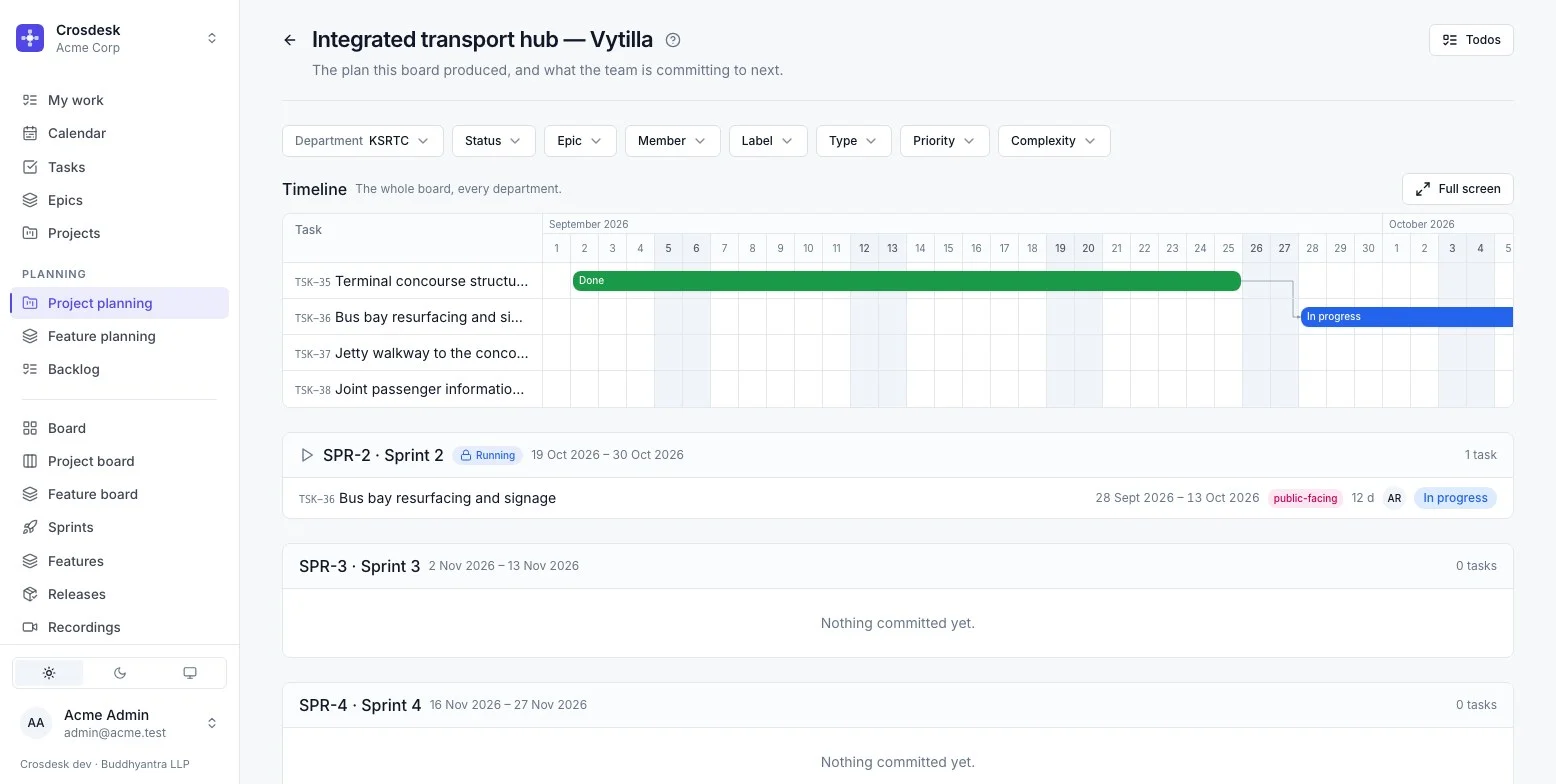
Project planning shows the whole board's timeline, then the department's own sprints beneath it. Commit work sprint by sprint; work that turns up mid-sprint sits beside the sprint, so the commitment still reads as one thing.
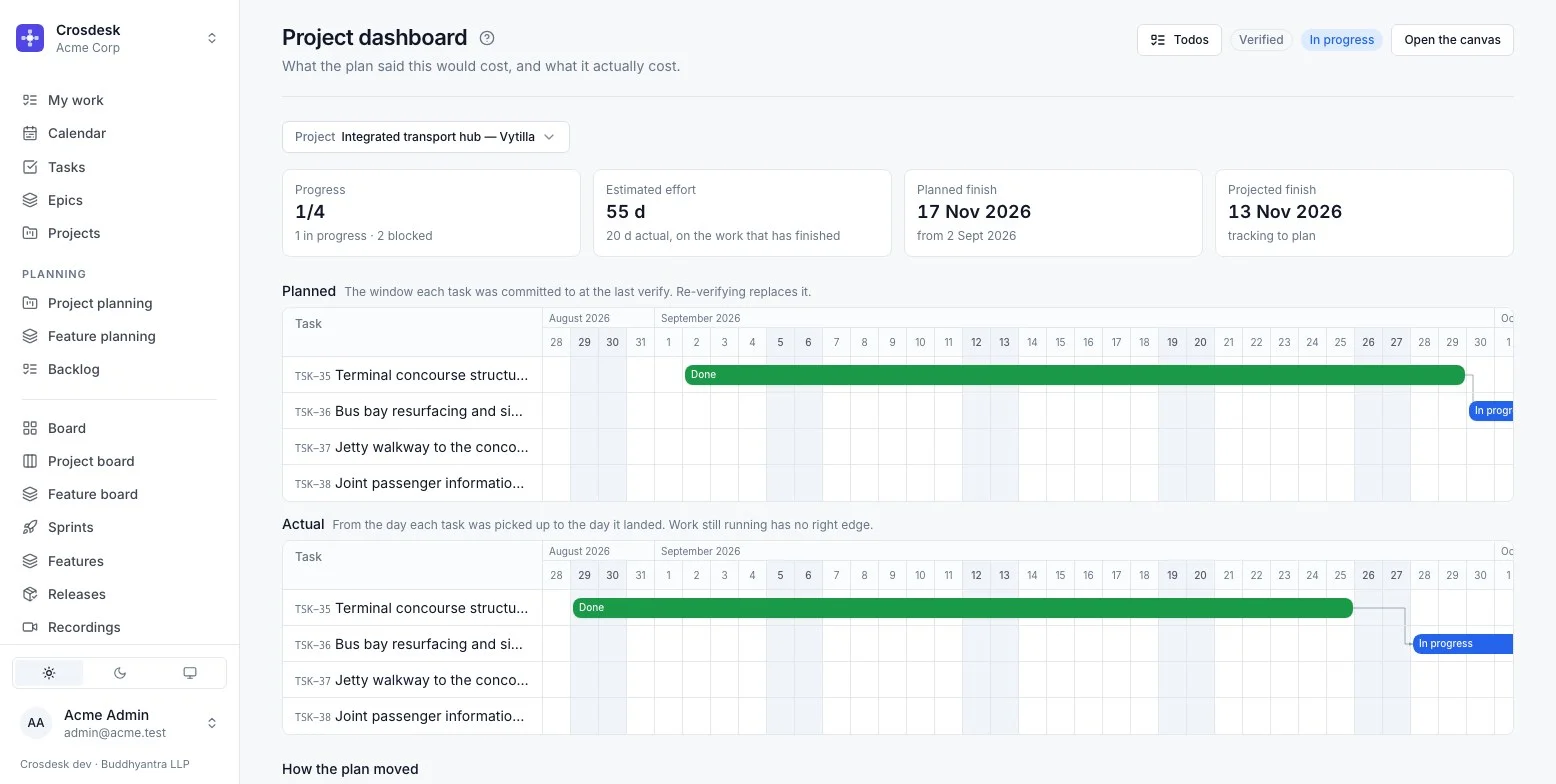
Planned against actual, task by task, on one axis. Three finish dates — promised, planned and projected — and How the plan moved: every slip, its cause and its size in working days.
Features
A feature is work too long and too consequential for a single task: it runs for months, passes through several departments, and somebody will later ask who approved what. Crosdesk runs it as a sequence of steps, with owners, approvers and a baseline.
The built-in Standard template. Save your own and make it the default.
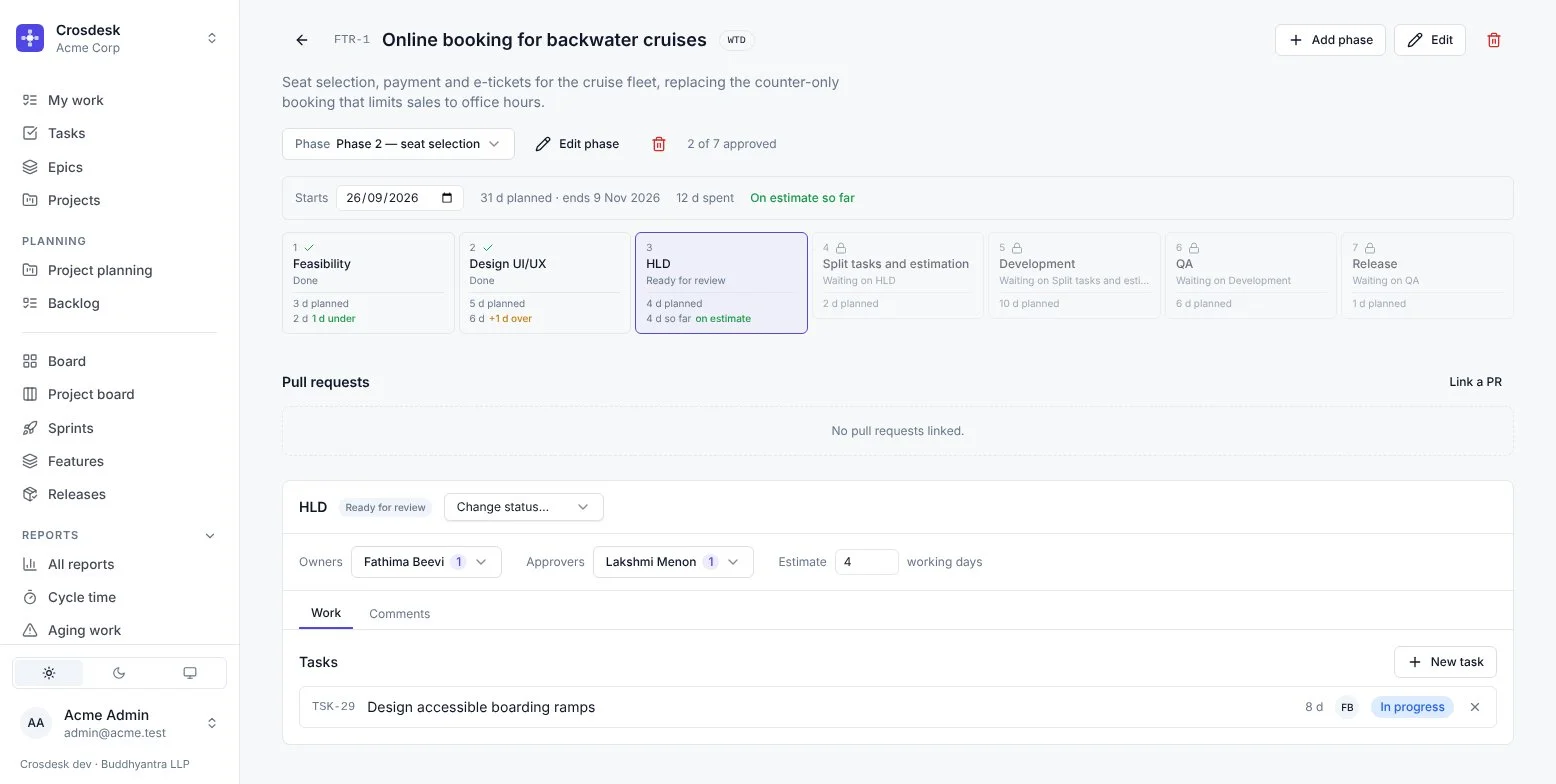
Owners send a step for review; approvers approve it or request changes with a comment, in the same action. Nobody approves their own step.
Phase 2 runs the whole step list again, with its own approvals. Owners, approvers and estimates carry over, so the next round starts from what the last one learned.
QA logs issues against a step. While any are open, the step cannot go to review or be approved — unless the same action closes them as won't fix, on the record.
One start date and a working-day estimate per step lays the round out. Each step shows planned against actual — +1 d over, 1 d under.
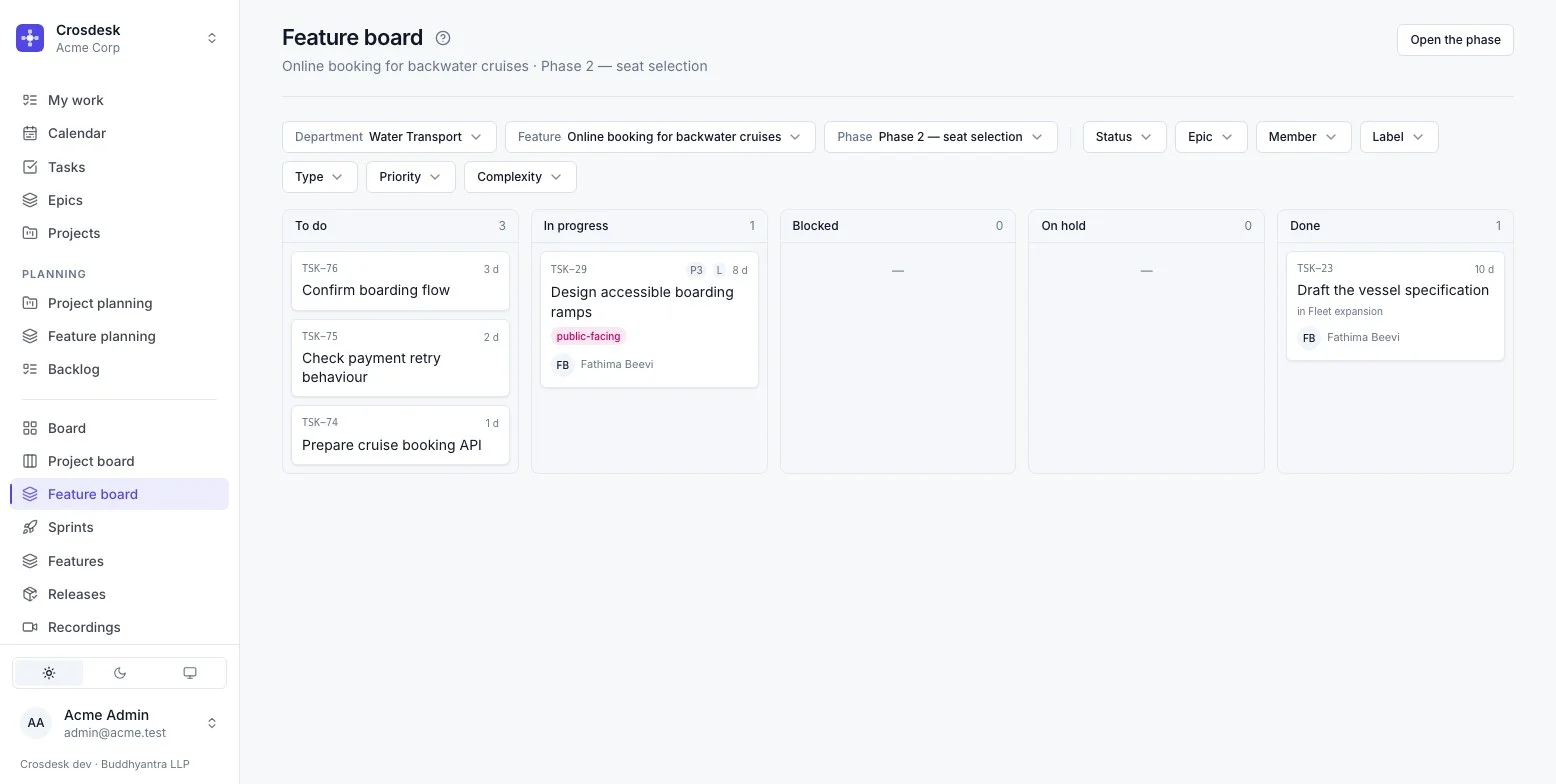
A feature spans departments; its work does not. The feature board shows one department's tasks for one phase — Water Transport sees Water Transport's — and feature planning drops them into that department's sprints.
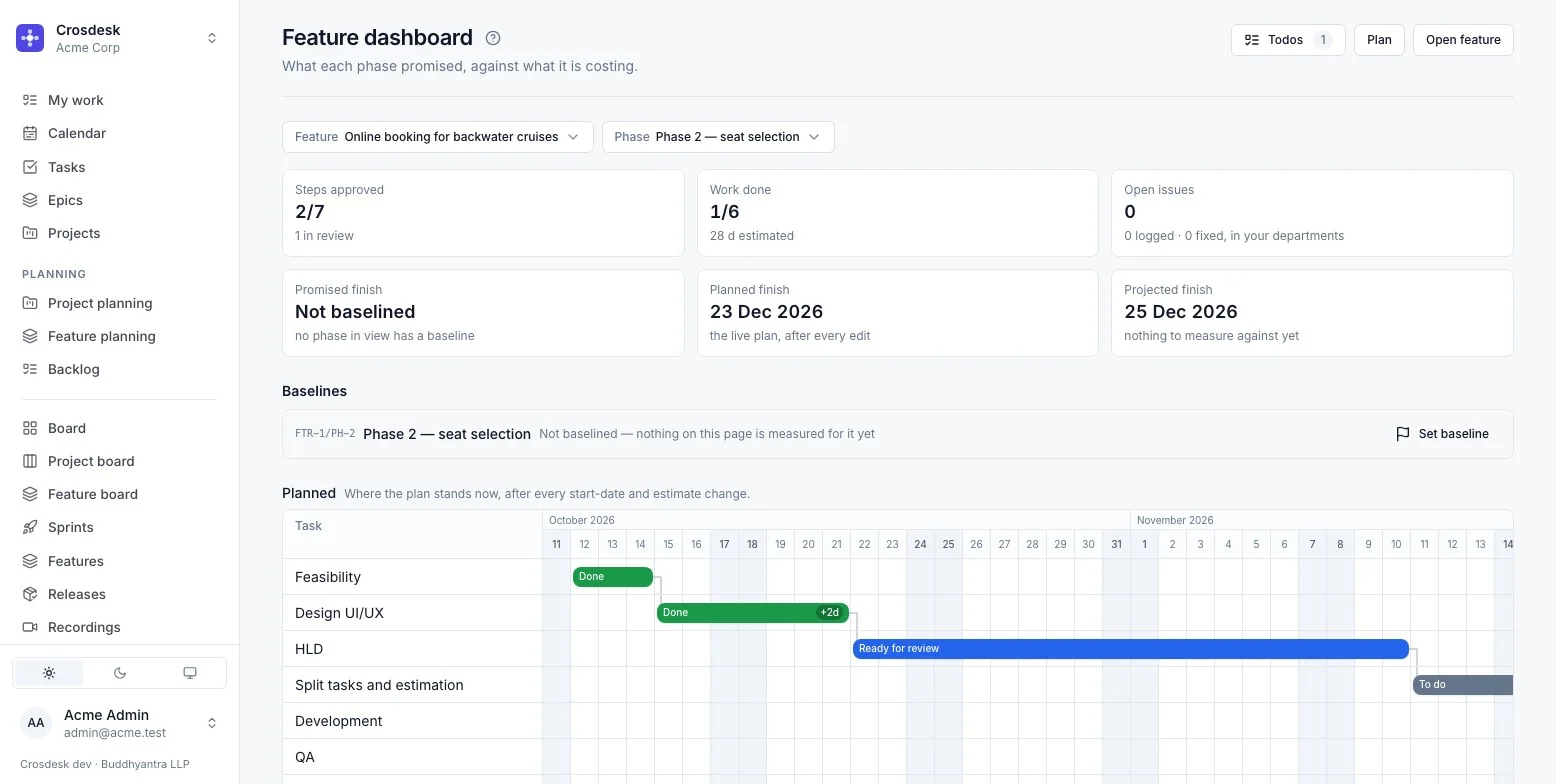
Steps approved, work done, open issues, and three finish dates against the phase's baseline. How many times each step was sent back, and a breakdown by department.
Reports
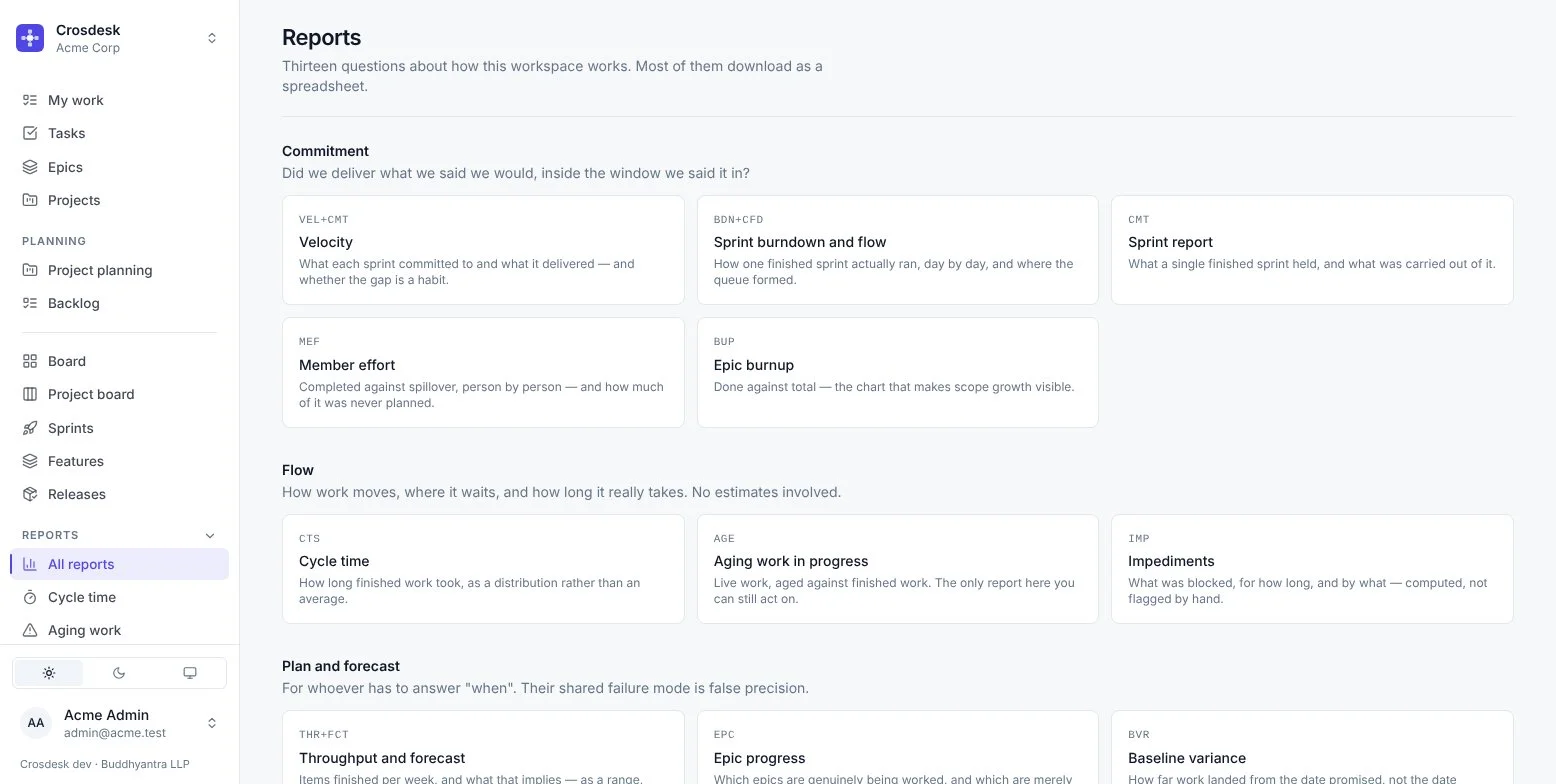
Computed on request from what Crosdesk already records — nothing to fill in, nothing stored to go stale. Distributions rather than averages, ranges rather than false dates, and every one downloads as CSV.
Did we deliver what we said we would?
How does work move? No estimates involved.
When? Without false precision.
Meetings · Todos · Recordings · Documents
Cross-department work runs on meetings, small promises, "it broke when I clicked this" and the document everyone agreed to. Crosdesk keeps all four attached to the task, feature step or project they are about, so nothing lives in a chat thread or a shared drive nobody can find.
A calendar in Day, Week and Month, with meetings linked to the work they are about. Open a task and its meetings are there; open a meeting and its work is one click away.
Checkout design review
Wed, 4 Nov 2026 · 10:00–11:00
Linked work
TSK-37 Payment API for the new checkout BlockedFTR-1/PH-2/HLD One-page checkout · HLD In reviewConfirm the payment provider’s go-live date
To Fathima · From Arun · on TSK-37
Not everything deserves a task. A todo is one sentence of work — "send the revised mockup", "confirm the date" — on exactly one task, issue, feature, phase, step or project, handed to one person.
Todos
TSK-37 · Payment API for the new checkout
Confirm the payment provider’s go-live date
To Fathima · From Arun · Checkout design review · 4 Nov
Send Design the error messages for declined cards
To Fathima
Get sandbox keys from the payment provider
To Fathima · Completed by Fathima
A bug report that shows what happened instead of describing it. The Crosdesk Recorder, a browser extension, records the tab — with its console and every network request beside it, in step as it plays.
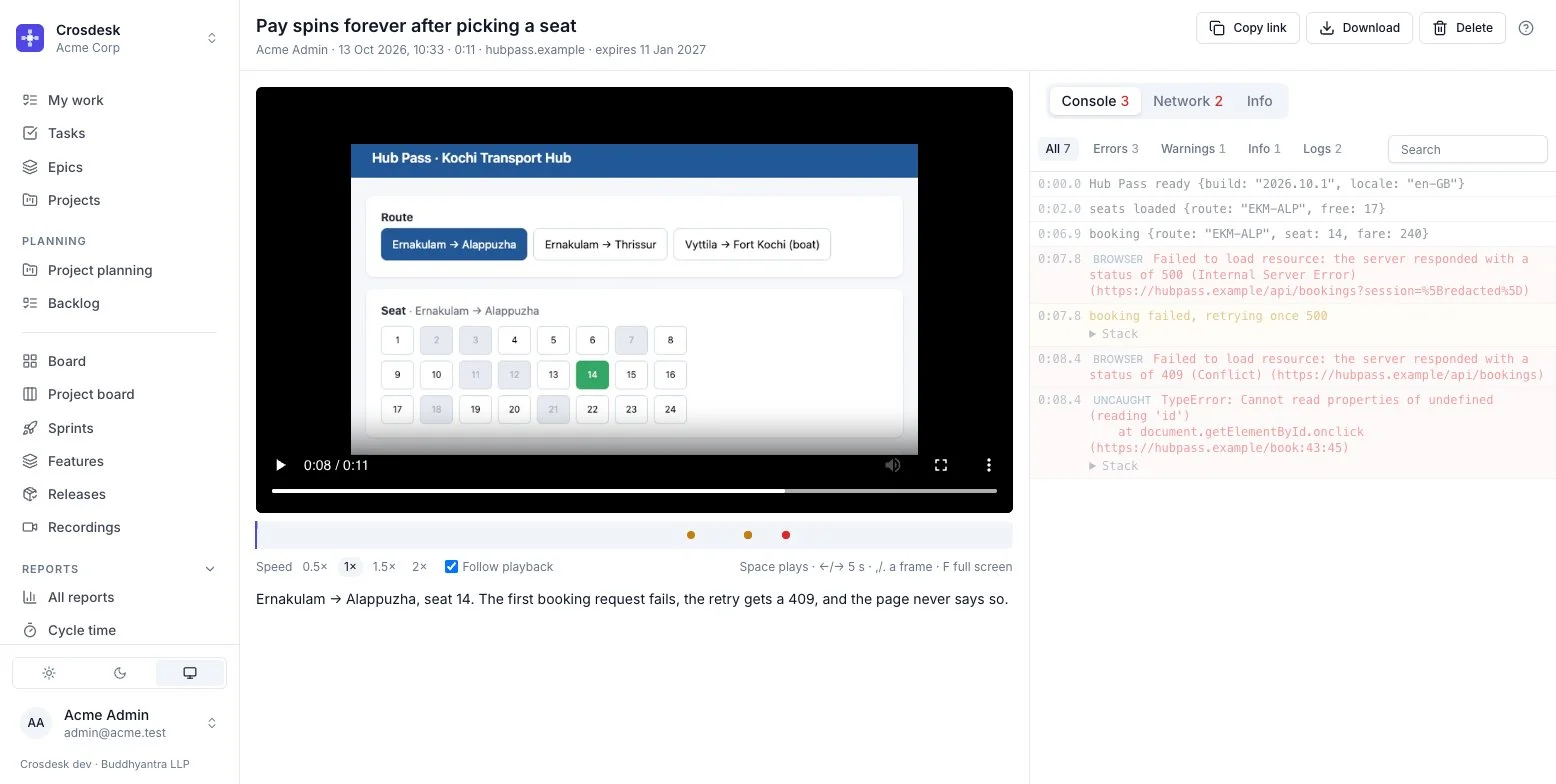
Press the toolbar button or Alt+Shift+R. Narrate with the microphone if you like. Record this bug on an issue links the recording as it is made.
Logs, warnings, errors and uncaught exceptions with their stacks. The line for the moment on screen is highlighted; click a line to jump the video there.
Method, address, status and timing for every request — open one for its headers, payload, response and timing. Failed requests are marked.
Errors in red, failed requests in amber, page loads as ticks. Click a mark to go straight to the moment it broke.
Cookies and authorization headers are dropped, and passwords, tokens and keys in addresses and JSON become [redacted] — in your browser, before anything is sent.
Pause where it goes wrong and comment. The video stops at each comment as it plays, so the developer sees exactly what you saw.
One extension, served by your own installation. It uses your Crosdesk sign-in and reaches only your Crosdesk address.
A recording expires ninety days after it was made, or thirty days after its linked work is done. Download the video and log as a zip to keep one.
The spec, the scope, the allocation table — written in Crosdesk, filed in a department's folder, and linked to the work it describes. Editors write a draft; when it is ready they save a numbered version that never changes, and release it. A link always opens what was released, not what somebody is halfway through typing.
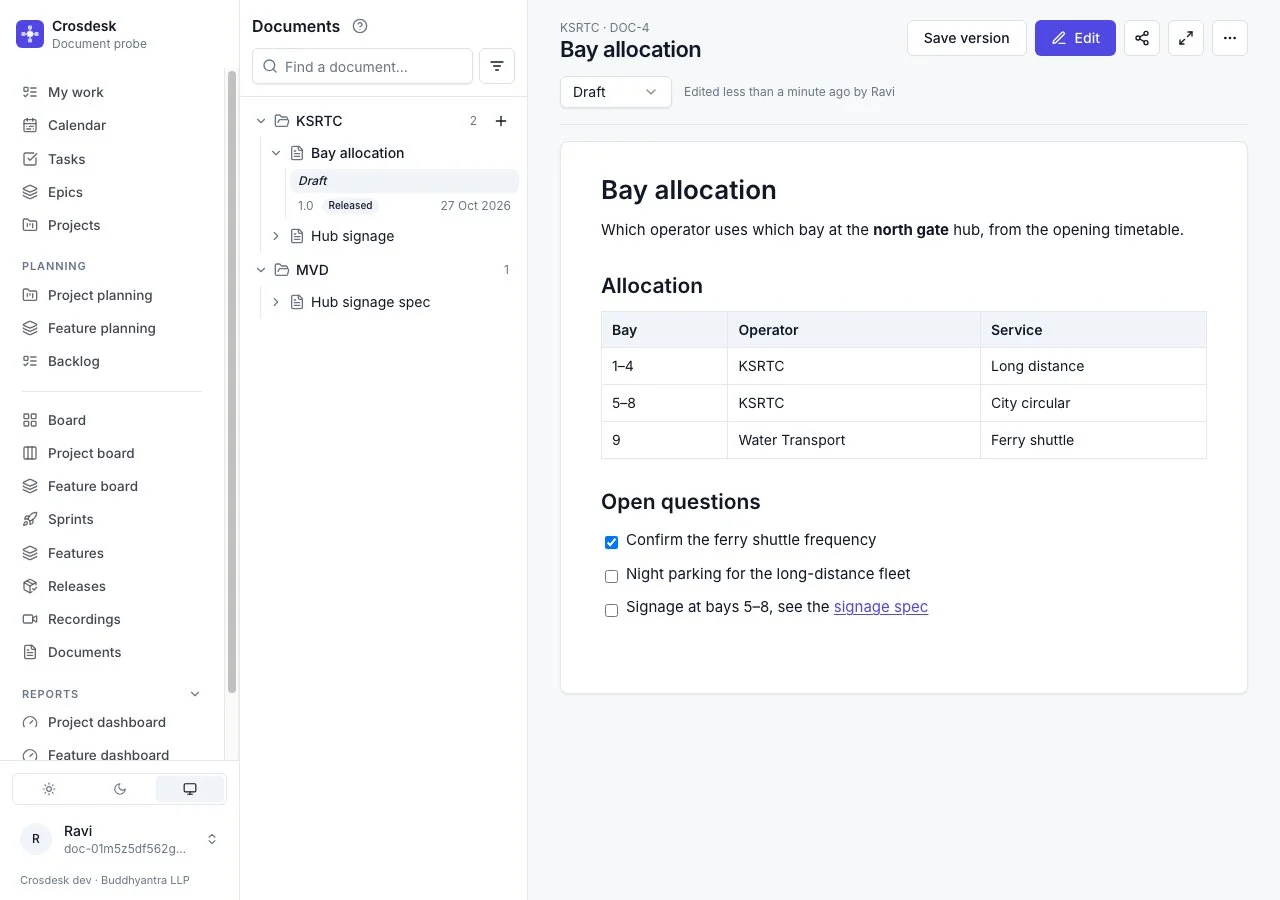
Headings, lists, checklists, tables, code, links and images from a toolbar or the keyboard. Paste from a web page or a word processor and the structure comes with it.
The draft saves as you type. Save version freezes it as 1.0, 1.1, 2.0 — you choose the number. Release the one that is agreed; a later release replaces it.
While you edit, the draft is yours and others see who has it. Nothing is ever written over — every save keeps a revision.
Select a passage and comment, or comment on a whole line. Threads are resolved and reopened; on the draft they follow their text, and say Outdated when it is gone.
Link a released document to tasks, issues, projects, features, phases, stages and releases — from the document or from the work. Each side shows the other.
The whole workspace reads every version, so a draft can be reviewed before release. The owner chooses the editors; a department's folder decides who may create there.
A connected AI agent reads any version, writes the draft under the same one-editor rule, saves and releases — as you, in the audit log. Archiving stays with people.
Archive a document or a single saved version and it leaves the explorer, but its text stays readable from its link. Copy any version out as Markdown.
Integrations
Single sign-on with your identity provider, Zoom rooms made from the meeting editor, pull requests that link themselves to the work they finish, and AI agents that work in Crosdesk as you. Each is set up once, from a screen — with secrets encrypted and never shown again.
Google, GitHub, GitHub Enterprise Server and any OpenID Connect provider — Okta, Microsoft Entra ID, Keycloak, Authentik, Auth0.
Add a Zoom meeting to any Crosdesk meeting. The room is created when you save, with the organiser as host.
Mention TSK-12 in a branch or pull request and it links itself — with review and CI status on the task.
Connect Claude, Cursor or any MCP client. It finds, creates and updates work as you — with your access and no more.
Each workspace creates its own GitHub App from Admin → GitHub in a few clicks — nothing to copy and paste. Install it on the repositories you choose, and every pull request that names Crosdesk work links to it.
FTR-7/PH-2/HLDTSK-12@acme, so a number never links to the wrong organisationPull requests
TSK-37 · Payment API for the new checkout
git push origin tsk-37-payment-api
Linked to TSK-37
TSK-37: Payment intent endpoint
shop/api #482 · linked by GitHub
Card form validation errors
shop/web #491 · linked by GitHub
Retry a declined payment once
shop/api #495 · linked by Fathima
TSK-12PRJ-4REL-3ISS-9FTR-7FTR-7/PH-2FTR-7/PH-2/HLD
Offer Continue with Google, GitHub or your own identity provider on the sign-in page, beside passwords and emailed one-time codes. Each provider is a card on the operator console: register the callback, paste the client details, press Test, switch it on.
The instance operator connects one Zoom account for the installation. From then on, every meeting editor offers Add Zoom meeting beside the video-call link.
Edit meeting
Checkout design review · weekly on Wed
Zoom meeting · created when you save
Hosted by Arun · one room for every occurrence
Or paste an https link from any other service.
Starts in 5 min · Checkout design review
On My work, for every guest
Crosdesk speaks the Model Context Protocol. Add it to claude.ai, Claude Desktop, Claude Code, Cursor or any MCP client, and ask in plain language: "What's overdue in Engineering?", "File a P1 bug for card payments timing out, assign it to Ravi, attach the recording", "Add a todo on TSK-42 from today's standup."
Claude · connected to Crosdesk
As Anitha Rajan · Acme Corp · Engineering
File a P1 bug for card payments timing out at checkout, assign it to me, and add a todo from today's standup to send the notes.
create_tasktype BUG · P1 · EngineeringTSK-88add_todoon TSK-88 · from StandupLinkedDone. TSK-88 is a P1 bug assigned to you in Engineering. I linked today's standup to it and added the todo Send the standup notes — it's on your My work.
Audit log · Task created · TSK-88
Anitha Rajan · Agent · Claude
Everyday screens
One page for what is yours today: assigned tasks, todos handed to you, and your meetings — overdue decided by the server, in the workspace’s time zone.
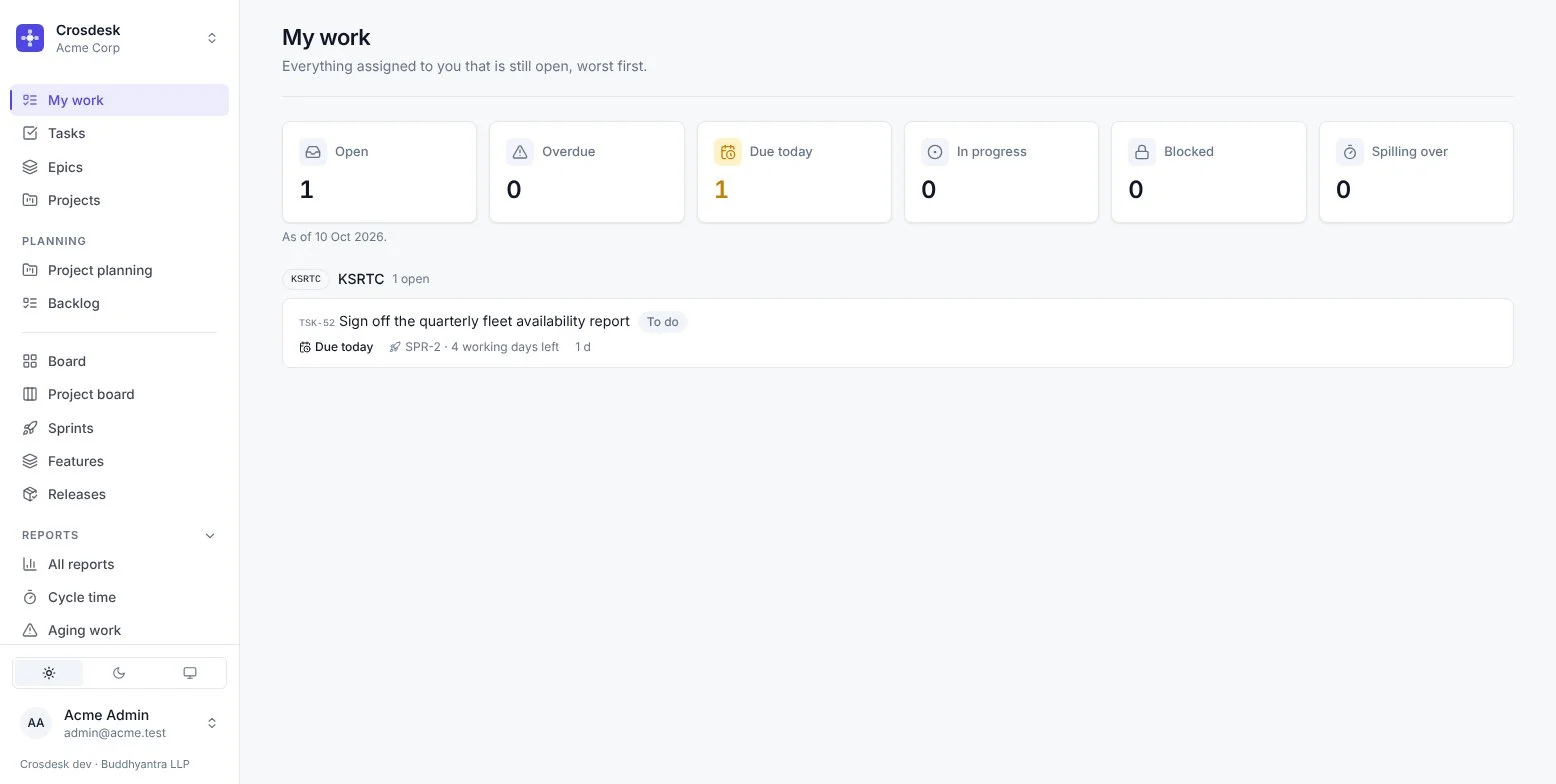
Triage with nullable priority — "nobody has looked yet" is a real answer — and group work into epics with burnup.
Every time on screen and in mail is in the workspace's zone, and "overdue" is decided by the server — never by a browser elsewhere.
Your working week and public holidays, set once by an admin and used by every plan, feature and forecast.
Every change written to the workspace log in the same transaction as the change itself — never a guess after the fact.
Assemble a release from tasks, projects and feature phases. Opt-in QA logs issues against it, and shipping marks the work done.
Every report downloads as a spreadsheet with the same numbers the screen shows — for the people who still live in Excel.
Who it's for
Agencies and departments delivering one programme — a transport hub, a citizen service — where each owns its part and the plan must hold together. Self-hosted, so data stays on your infrastructure.
Product, design, engineering and QA passing a feature from feasibility to release, with sign-off at every step and one dashboard per phase.
Several business units, or several organisations, on one installation — each workspace separate, each department seeing its own.
The people asked "who is late, and why?" — with a baseline that does not move when the plan does, and a scorecard that separates late from blocked.
Self-hosted
Crosdesk ships as a single Docker image with PostgreSQL behind it. Run it on your own infrastructure or a platform like Railway — one installation holds as many organisations as you need.
# one process serves the app, the API and the manual
$ docker run -d -p 3000:3000 \
    -e DATABASE_URL=postgres://… \
    -e CONFIG_ENCRYPTION_KEY=… \
    -e SERVE_FRONT_END=true \
    gsmithun4/cros-desk:latest

Migrations applied
Storage: local (writable)
Listening on :3000
Questions
Those are built around a team's board. Crosdesk is built around departments sharing a project: visibility follows department membership, plans are computed from dependencies rather than typed in, and the scorecard measures each department's slice of a shared plan against its baseline.
Not its tasks in general. On a project both departments are part of, everyone involved sees the whole plan, because a dependency you cannot see is one you cannot plan around. Admins see every department.
From two things the department controls: the share of its finished work that landed by the date the plan gave it, and actual days against its own estimates. Below 60% on time is Strained. Work blocked by another department is reported separately and never counted against it.
Yes, over the Model Context Protocol: claude.ai, Claude Desktop, Claude Code, Cursor and other MCP clients connect by signing in, or with a personal access token. An agent acts as the person who connected it, in one workspace, with exactly their access — and never the Admin area, never a delete, and only what that person allowed when connecting (read, change work, upload recordings). Everything it changes is in the audit log under that person, marked as the agent. Agents are off until the operator turns them on, and a workspace admin can turn them off.
No. Estimates are in working days, and dates come from the plan and from when work actually moved. Nothing in Crosdesk asks anyone to fill in a timesheet.
The tab's video, its console and its network requests with headers and text bodies. Cookies and authorization headers are dropped, and fields named like passwords, tokens or keys are replaced with [redacted] in your browser before upload. A recording opens only for people signed in to that workspace — there is no public link.
No. Documents are versioned specs filed in a department's folder and linked to the work they describe — not a tree of pages. One editor writes the draft at a time, with no live co-editing, and what a link opens is the version that was released. Everyone in the workspace can read and comment on every version.
Not today. A meeting appears in its guests' Crosdesk calendar and on their My work, with a reminder banner before it starts. Email invitations, browser notifications and external guests are not available yet.
Yes — sign up free at app.crosdesk.com and start a workspace straight away. When you want your data on your own infrastructure, Crosdesk is also self-hosted under a signed licence: you run the image on your own servers or cloud account, and your data never leaves it. We can help with installation.
Per installation, under a signed licence key installed from the operator console. Request a demo and we will talk through what fits your organisation.
Try it free
Sign up with your work email, name your organisation and invite your departments. No card, no installation — the same Crosdesk you would run on your own servers.
Request a demo
Tell us how your organisation is split and what you deliver together. We will walk you through a demo installation set up around it, and talk about licensing.
Prefer email? Write to hello@buddhyantra.com